

Advertising disclosure: This article may contain affiliate links. If you buy through them, SpentMore may earn a commission at no extra cost to you. Commissions do not affect which products we recommend.
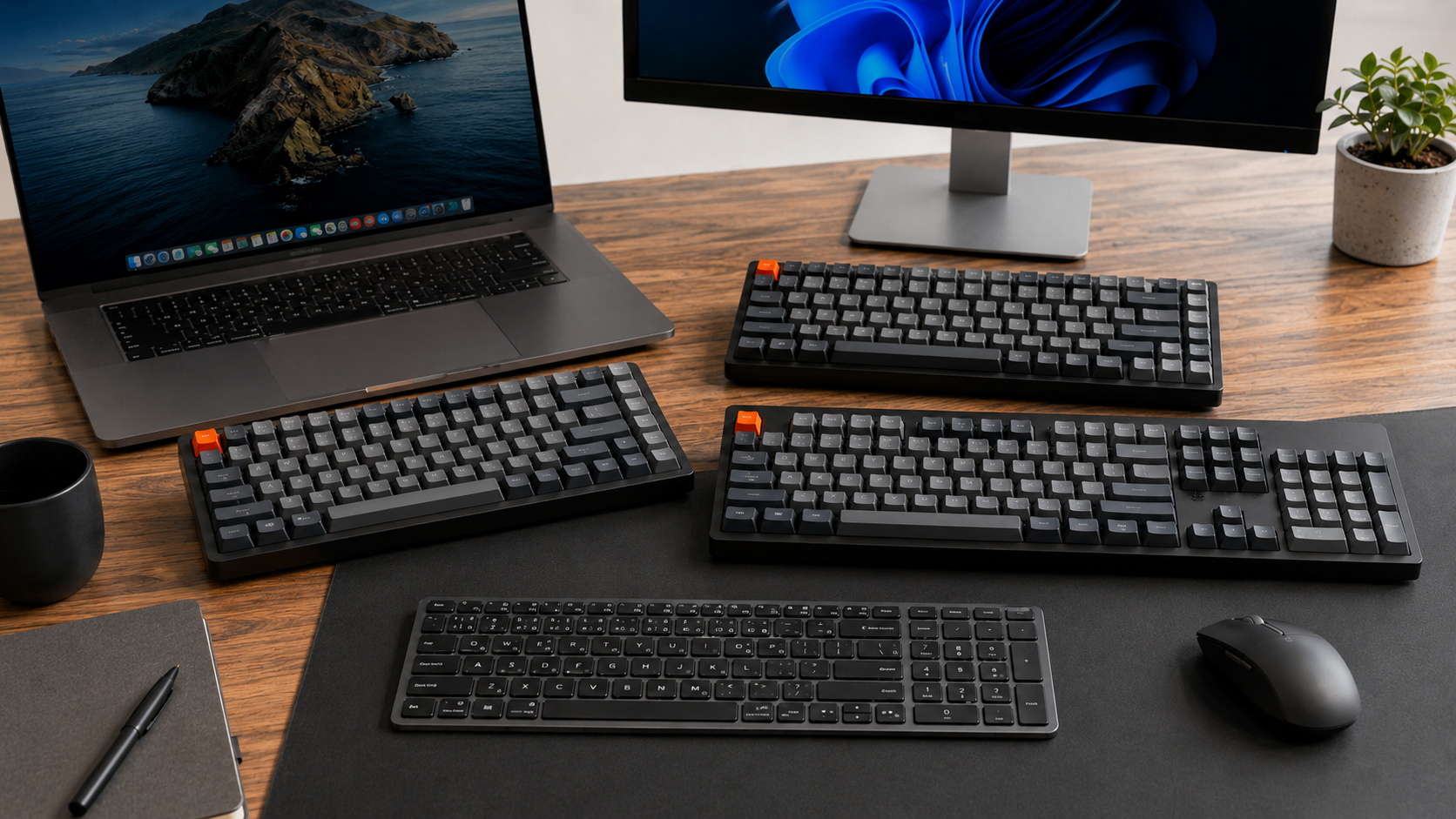
Keychron is one of the strongest keyboard brands for people who want a better typing setup for Mac, Windows, office work, writing, study, coding, and everyday productivity. The brand focuses on custom mechanical keyboards, low profile keyboards, ultra slim keyboards, full size keyboards, compact layouts, wireless keyboards, wired keyboards, mice, keycaps, switches, palm rests, cables, cases, desk mats, and other keyboard accessories.
The main reason Keychron stands out is choice. The official website currently lets users shop by keyboard series, including Q Ultra 8K, K Ultra 8K, V Ultra 8K, HE Series, Q Max, K Max, V Max, K QMK, B Series, C Series, Lemokey, and collaboration keyboards. It also lets users choose by layout, including 100 percent, 96 percent, 80 percent, 75 percent, 65 percent, and 60 percent.
For everyday typing, the best Keychron keyboard is not always the most expensive model. The right choice depends on your desk space, operating system, number pad needs, wireless preference, typing height, customization needs, and whether you prefer a premium metal build or a lighter portable keyboard.
“A good everyday keyboard should feel comfortable, connect easily, and match the way you actually work.”
This guide reviews the best Keychron keyboards for Mac, Windows, and everyday typing using real product information from Keychron’s official website.
Why Keychron Is a Strong Brand for Mac and Windows Users
Keychron is especially useful for users who move between different devices. Many of its keyboards support macOS and Windows, while selected models also support Linux, iOS, Android, phones, and tablets.
Keychron also offers different connection choices depending on the model. These can include 2.4 GHz wireless, Bluetooth, and Type C wired connection. That makes the brand useful for people who want a clean desk setup, a flexible work setup, or a keyboard that can move between multiple devices.
Keychron is also strong because it offers many keyboard types for different users:
• Full size keyboards for number pad users
• 96 percent keyboards for compact full function setups
• 80 percent keyboards for tenkeyless productivity
• 75 percent keyboards for compact everyday typing
• Low profile keyboards for slim desk setups
• Ultra slim keyboards for office and travel
• Full metal keyboards for premium desk setups
• Hot swappable keyboards for switch changes
• QMK, ZMK, VIA, and Keychron Launcher support on selected models
• Wireless keyboards with 2.4 GHz and Bluetooth
• Wired keyboards for users who prefer a simple fixed setup
This makes Keychron suitable for writers, students, office workers, developers, creators, gamers, Mac users, Windows users, and people building a better home desk.
Best Keychron Keyboards for Mac Windows and Everyday Typing
1. Keychron K2 Ultra 8K
Best Compact Keychron Keyboard for Everyday Typing
The Keychron K2 Ultra 8K is one of the best Keychron choices for people who want a compact keyboard without going too small. It uses a 75 percent layout, which means it saves desk space while still keeping important productivity keys.
Keychron describes the K2 Ultra 8K as a wireless mechanical keyboard with a 75 percent layout, 8000 Hz polling rate, Bluetooth, wired connection, 2.4 GHz wireless connection, ZMK firmware, and up to 760 hours of battery life with the backlight off.
Main features
• 75 percent compact layout
• 2.4 GHz wireless connection
• Bluetooth 5.2
• Type C wired connection
• 8000 Hz polling rate option
• ZMK firmware
• Keychron Launcher customization
• OSA double shot PBT keycaps
• Keychron Apex Switch
• Hot swappable support
• macOS, Windows, and Linux support
• Up to 760 hours of wireless use with backlight off
Why it is good for everyday typing
The K2 Ultra 8K is a strong daily keyboard because it gives you a compact layout without removing too many useful keys. It works well for writing, emails, study, coding, browsing, and normal office work.
It is also useful if you move between devices. You can use Bluetooth, 2.4 GHz, or a Type C wired connection depending on your setup.
Best for
Choose the Keychron K2 Ultra 8K if you want a compact wireless keyboard for Mac, Windows, study, writing, coding, and everyday productivity.
2. Keychron K8 Ultra 8K
Best Keychron Tenkeyless Keyboard for Work and Typing
The Keychron K8 Ultra 8K uses an 80 percent tenkeyless layout. This means it keeps a familiar keyboard shape with arrows and navigation keys but removes the number pad to save desk space.
Keychron describes the K8 Ultra 8K as a wireless mechanical keyboard with an 80 percent TKL layout, 8000 Hz polling rate, Bluetooth, wired connection, 2.4 GHz wireless connection, ZMK firmware, and up to 760 hours of battery life.
Main features
• 80 percent TKL layout
• 2.4 GHz wireless connection
• Bluetooth 5.2
• Type C wired connection
• 8000 Hz polling rate option
• ZMK firmware
• Up to 760 hours of wireless use with backlight off
• Hot swappable support
• Keychron Apex Switch
• Interior acoustic foam
• macOS, Windows, and Linux support
Why it is good for everyday typing
The K8 Ultra 8K is a good choice if you want more room for your mouse but still like a more traditional keyboard layout. The 80 percent layout is easier to adjust to than very small compact keyboards.
It can be used for typing, coding, documents, emails, gaming, and everyday work. It also supports Bluetooth switching between up to three devices, which is useful if you use more than one computer or tablet.
Best for
Choose the Keychron K8 Ultra 8K if you want a tenkeyless wireless keyboard for Mac, Windows, work, typing, and a cleaner desk setup.
3. Keychron K3 Max SE
Best Slim Mechanical Keychron Keyboard
The Keychron K3 Max SE is an ultra slim wireless custom mechanical keyboard. It uses a 75 percent compact layout and is a better option for users who like a lower keyboard height.
Keychron says the K3 Max SE supports 2.4 GHz, Bluetooth, and wired connection. It also works with the Keychron Launcher web app and includes low profile keycaps for both Windows and macOS.
Main features
• 75 percent compact layout
• Ultra slim wireless mechanical design
• 2.4 GHz wireless connection
• Bluetooth support
• Type C wired connection
• Keychron Launcher customization
• QMK support
• LSA low profile keycaps
• Keycaps for Windows and macOS
• Hot swappable support
• Keychron Milk POM low profile switch
• macOS, Windows, and Linux support
Why it is good for everyday typing
The K3 Max SE is a strong option for people who do not want a tall mechanical keyboard. Its low profile design can feel easier for users coming from laptop keyboards or slim office keyboards.
It is also useful for smaller desks because the 75 percent layout saves space while still keeping a practical typing layout.
Best for
Choose the Keychron K3 Max SE if you want a slim mechanical keyboard for Mac, Windows, travel style setups, office work, and everyday typing.
4. Keychron K10 Max
Best Full Size Keychron Keyboard for Work
The Keychron K10 Max is a full size 100 percent wireless mechanical keyboard. This makes it one of the best Keychron options for users who need a number pad.
Keychron says the K10 Max supports 2.4 GHz, Bluetooth, and wired connection. It can be configured through QMK and Keychron Launcher. The product page also says it includes a system toggle and customized keycaps for both Windows and macOS.
Main features
• 100 percent full size layout
• Number pad included
• 2.4 GHz wireless connection
• Bluetooth connection
• Wired connection
• QMK support
• Keychron Launcher customization
• System toggle for Mac and Windows
• Keycaps for Windows and macOS
• Multiple acoustic foam layers
• Hot swappable support on supported version
Why it is good for everyday typing
The K10 Max is best for people who type and work with numbers every day. A full size layout is useful for spreadsheets, accounting, invoices, admin work, data entry, product listings, and office tasks.
It is also practical for users who switch between Mac and Windows because the keyboard includes a system toggle and additional keycaps for both systems.
Best for
Choose the Keychron K10 Max if you want a full size keyboard for Mac, Windows, office work, spreadsheets, number entry, and everyday typing.
5. Keychron Q1 Ultra 8K
Best Premium Compact Keychron Keyboard
The Keychron Q1 Ultra 8K is a premium 75 percent wireless custom mechanical keyboard. It is designed for users who want a compact layout with a higher quality build.
Keychron describes the Q1 Ultra 8K as a next generation 75 percent keyboard with an all metal build, 2.4 GHz wireless, Bluetooth 5.3, wired connection, ZMK firmware, 8K polling rate, up to 660 hours of battery life, and multiple layers of acoustic foam.
Main features
• 75 percent compact layout
• All metal build
• 2.4 GHz wireless connection
• Bluetooth 5.3
• Wired connection
• ZMK firmware
• 8000 Hz polling rate option
• Up to 660 hours with backlight off
• Multiple acoustic foam layers
• Keychron Silk POM Switch
• Custom keyboard design
Why it is good for everyday typing
The Q1 Ultra 8K is a strong choice if you want a premium compact keyboard for a permanent desk setup. It is more premium than basic compact keyboards because of its metal build, acoustic design, wireless support, and customization options.
It works well for writing, coding, creative work, office work, and daily productivity.
Best for
Choose the Keychron Q1 Ultra 8K if you want a premium compact keyboard for Mac, Windows, productivity, coding, and a clean desk setup.
6. Keychron Q6 Ultra 8K
Best Premium Full Size Keychron Keyboard
The Keychron Q6 Ultra 8K is the premium full size option in this guide. It uses a 100 percent full size layout, so it includes the number pad.
Keychron describes the Q6 Ultra 8K as a next generation full size wireless custom mechanical keyboard with an all metal build, 2.4 GHz wireless, Bluetooth 5.3, wired connection, ZMK firmware, 8K polling rate, up to 660 hours of battery life, and multiple layers of acoustic foam.
Main features
• 100 percent full size layout
• Number pad included
• All metal build
• 2.4 GHz wireless connection
• Bluetooth 5.3
• Wired connection
• ZMK firmware
• 8000 Hz polling rate option
• Up to 660 hours with backlight off
• Multiple acoustic foam layers
• Keychron Silk POM Switch options
Why it is good for everyday typing
The Q6 Ultra 8K is best for users who want both premium build quality and full size productivity. It is suitable for people who need a number pad but still want a refined custom keyboard for daily work.
It is a strong option for office work, spreadsheets, coding, writing, creative workflows, and users who want a heavier premium keyboard on the desk.
Best for
Choose the Keychron Q6 Ultra 8K if you want a premium full size Keychron keyboard for Mac, Windows, number pad work, and everyday typing.
7. Keychron V6 Max
Best Full Size Custom Keyboard for Typing Comfort
The Keychron V6 Max is a full size 100 percent QMK custom mechanical keyboard with 2.4 GHz wireless and Bluetooth 5.1 connection.
Keychron says it has a gasket mount design, sound absorbing foam, double shot PBT keycaps, and a full size layout. It is designed for a personalized experience and enhanced typing comfort.
Main features
• 100 percent full size layout
• 2.4 GHz wireless connection
• Bluetooth 5.1
• QMK support
• VIA support
• Gasket mount design
• Sound absorbing foam
• Double shot PBT keycaps
• System toggle for Mac and Windows
• Additional keycaps for macOS and Windows
• Full size productivity layout
Why it is good for everyday typing
The V6 Max is a strong everyday keyboard because it gives you a full size layout with customization and typing comfort features. It is a practical option for users who want a full size custom keyboard but do not need the more premium all metal Q Ultra build.
It is especially useful for people who need a number pad but still want wireless connection, Mac and Windows layouts, and a softer typing design.
Best for
Choose the Keychron V6 Max if you want a full size custom mechanical keyboard for typing comfort, office work, Mac, Windows, and daily productivity.
8. Keychron B1 Pro
Best Ultra Slim Keychron Keyboard for Office and Travel
The Keychron B1 Pro is different from the mechanical keyboards above. It is an ultra slim wireless keyboard designed for users who want a light, simple, portable typing setup.
Keychron says the B1 Pro has up to 1200 hours of continuous battery life, which the brand describes as around 8 months based on 5 hours of daily use. Its specifications list 2.4 GHz, Bluetooth, and Type C wired connection, Bluetooth 5.2, and support for macOS, iOS, Windows, Android, and Linux.
Main features
• 75 percent compact layout
• Ultra slim keyboard design
• 2.4 GHz wireless connection
• Bluetooth 5.2
• Type C wired connection
• Up to 8 months of wireless working time
• 800 mAh rechargeable battery
• Compatible with macOS, iOS, Windows, Android, and Linux
• Useful for laptop, tablet, phone, and desktop setups
Why it is good for everyday typing
The B1 Pro is best for people who do not need a full mechanical keyboard. It is a better fit for users who want a slim keyboard for travel, study, office work, emails, and light daily productivity.
It is also useful for people who use multiple systems because it supports macOS, iOS, Windows, Android, and Linux.
Best for
Choose the Keychron B1 Pro if you want an ultra slim keyboard for office work, travel, laptop setups, tablets, phones, Mac, Windows, and everyday typing.
Which Keychron Keyboard Should You Choose?
Best Overall Compact Choice
Choose the Keychron K2 Ultra 8K if you want a compact 75 percent wireless mechanical keyboard with Bluetooth 5.2, 2.4 GHz, Type C wired connection, ZMK, hot swappable support, and long battery life.
Best Tenkeyless Choice
Choose the Keychron K8 Ultra 8K if you want an 80 percent TKL keyboard that keeps more dedicated keys than a 75 percent layout while saving space compared with a full size keyboard.
Best Slim Mechanical Choice
Choose the Keychron K3 Max SE if you want a low profile mechanical keyboard with a compact 75 percent layout, QMK support, Launcher customization, and Mac or Windows keycaps.
Best Full Size Work Choice
Choose the Keychron K10 Max if you need a number pad and want a wireless full size mechanical keyboard for office work, spreadsheets, and daily productivity.
Best Premium Compact Choice
Choose the Keychron Q1 Ultra 8K if you want a premium compact keyboard with an all metal build, wireless connection, acoustic foam, ZMK, and long battery life.
Best Premium Full Size Choice
Choose the Keychron Q6 Ultra 8K if you want a premium full size keyboard with a number pad, all metal build, wireless connection, and high end custom keyboard features.
Best Full Size Typing Comfort Choice
Choose the Keychron V6 Max if you want a full size custom keyboard with gasket mount design, sound absorbing foam, double shot PBT keycaps, Mac and Windows support, and wireless connection.
Best Ultra Slim Office Choice
Choose the Keychron B1 Pro if you want a light, ultra slim keyboard for office work, travel, laptop use, tablet use, and long battery life.
How to Choose the Right Keychron Keyboard
Choose the Layout First
A 100 percent layout is best if you need a number pad. Choose K10 Max, Q6 Ultra 8K, or V6 Max.
An 80 percent layout is best if you want a traditional feel without the number pad. Choose K8 Ultra 8K.
A 75 percent layout is best if you want compact productivity. Choose K2 Ultra 8K, K3 Max SE, Q1 Ultra 8K, or B1 Pro.
Choose Slim or Full Profile
Choose K3 Max SE or B1 Pro if you prefer a lower keyboard height.
Choose K2 Ultra 8K, K8 Ultra 8K, K10 Max, Q1 Ultra 8K, Q6 Ultra 8K, or V6 Max if you want a fuller mechanical keyboard experience.
Choose Wireless or Wired
If you want flexibility, choose a model with 2.4 GHz, Bluetooth, and Type C wired connection.
If you mainly work at one desk, wired mode can still be useful because you do not need to worry about charging or wireless switching.
Check Mac and Windows Support
Many Keychron keyboards are built with Mac and Windows users in mind. Some models include system toggles and extra keycaps for both operating systems.
Always check the exact product page before buying because compatibility and included keycaps can vary by model.
Check Customization Features
If you want to remap keys, create macros, or adjust shortcuts, look for QMK, VIA, ZMK, or Keychron Launcher support.
This matters for writers, programmers, creators, editors, productivity users, and anyone who wants a keyboard workflow that matches their habits.
Check Battery Life
Battery life depends on the model, backlight setting, connection mode, and usage. For example, Keychron lists up to 760 hours for the K2 Ultra 8K and K8 Ultra 8K with backlight off, up to 660 hours for Q1 Ultra 8K and Q6 Ultra 8K with backlight off, and up to 8 months for the B1 Pro under its stated usage conditions.
Final Verdict
Keychron is one of the best keyboard brands for Mac, Windows, and everyday typing because it offers many real choices instead of one basic keyboard type. You can choose compact, full size, slim, ultra slim, premium metal, hot swappable, wireless, wired, QMK supported, ZMK supported, and office friendly keyboards from the same brand.
For most everyday users, the Keychron K2 Ultra 8K is a strong compact choice because it combines a 75 percent layout, wireless connection, wired connection, ZMK customization, hot swappable support, and long battery life.
For users who prefer a tenkeyless layout, the Keychron K8 Ultra 8K is a better fit. For slim mechanical typing, the Keychron K3 Max SE is the best option in this guide. For full size work, the Keychron K10 Max and V6 Max are practical choices. For premium setups, the Q1 Ultra 8K and Q6 Ultra 8K stand out because of their all metal builds and acoustic focused designs. For office and travel, the B1 Pro is the most portable option here.
“The best Keychron keyboard is the one that matches your layout, operating system, desk space, and typing style.”